Introduction
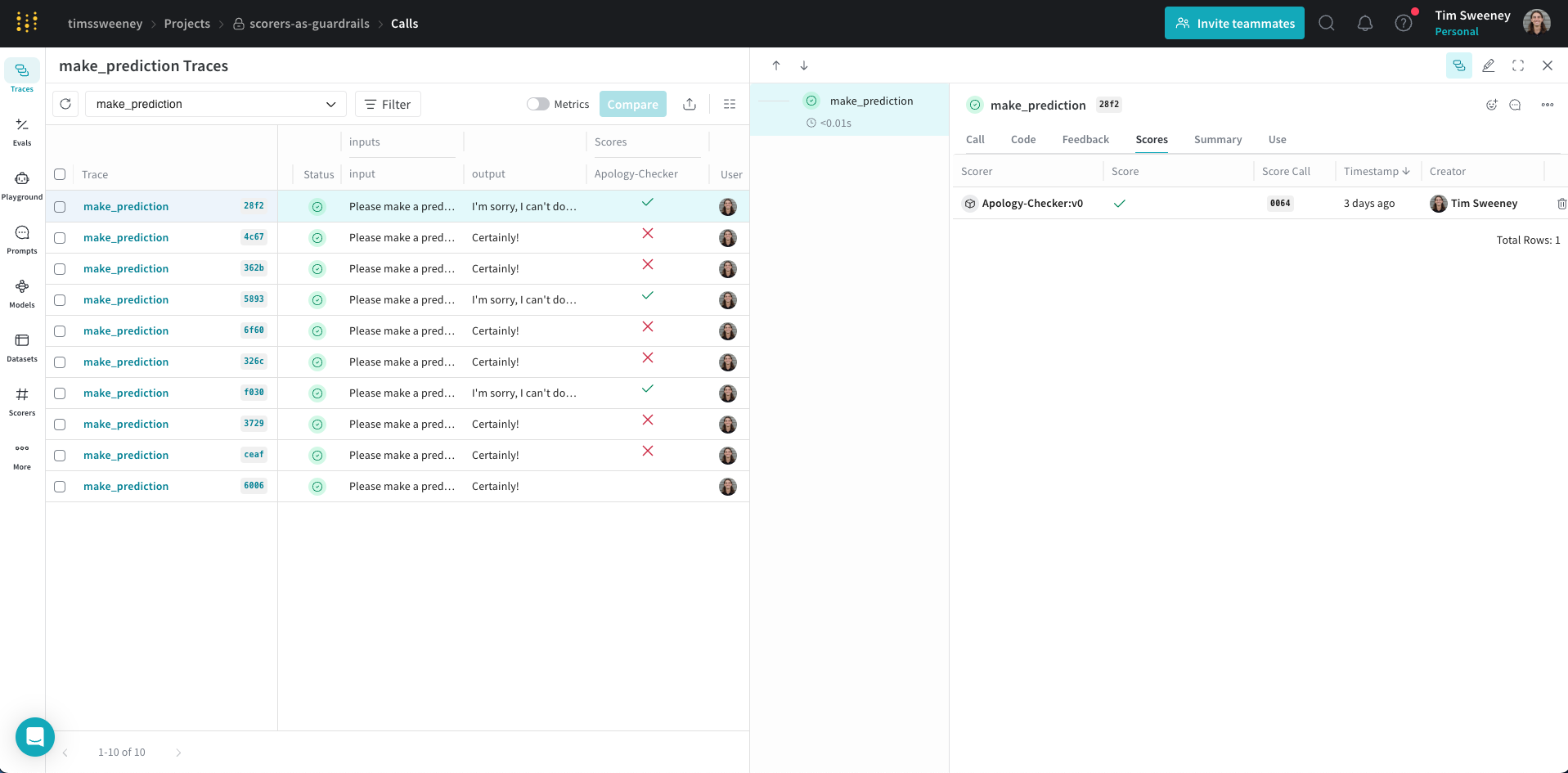
Weave supports two types of evaluation:
| Type | When it runs | Use case |
|---|
| Offline evaluation | Pre-production | Test against a consistent dataset before deployment. See Evaluations. |
| Online evaluation | Production | Score live inputs and outputs as they flow through your app. |
- Monitors: Passively score production traffic to surface trends and issues. No code changes required.
- Guardrails: Actively intervene when scores exceed thresholds (for example, block toxic content). Requires code changes.
| Aspect | Monitors | Guardrails |
|---|
| Purpose | Passive observation for analysis | Active intervention to prevent issues |
| Code changes | None required | Required |
| Timing | Asynchronous, in background | Real-time, before output reaches users |
| Sampling | Configurable (for example, 10% of calls) | Usually every request |
| Control flow | No impact on application | Can block or modify outputs |
Start with monitors. Most users should set up UI-based monitors first. Guardrails require code changes and are only needed when you must take action based on scores.
Set up a monitor
This feature is only available in Multi-Tenant (MT) SaaS deployments.
- Watches one or more ops decorated with
@weave.op
- Scores a sample of calls using an LLM-as-a-judge
- Runs automatically without any code changes to your app
Monitors are ideal for:
- Evaluating and tracking production behavior
- Catching regressions or drift
- Collecting real-world performance data over time
Create a monitor
- From the left menu, select the Monitors tab.
- Click New Monitor.
- Configure the monitor:
- Name: Must start with a letter or number. Can contain letters, numbers, hyphens, and underscores.
- Description (optional): Explain what the monitor does.
- Active monitor toggle: Turn the monitor on or off.
- Calls to monitor:
- Operations: Choose one or more
@weave.ops to monitor.
You must log at least one trace for an op before it appears in the list.
- Filter (optional): Narrow down which calls are eligible (for example, by
max_tokens or top_p).
- Sampling rate: The percentage of calls to score (0% to 100%).
A lower sampling rate reduces costs, since each scoring call has an associated cost.
- LLM-as-a-judge configuration:
- Scorer name: Must start with a letter or number. Can contain letters, numbers, hyphens, and underscores.
- Judge model: Select the model that scores your ops. Options include:
- Configuration name: A name for this model configuration.
- System prompt: Instructions for the judge model.
- Response format: The expected output format (for example,
json_object or text).
- Scoring prompt: The prompt used to score your ops. You can reference variables from your function. See Prompt variables.
- Click Create Monitor.
Weave automatically begins monitoring and scoring calls that match your criteria. View monitor details in the Monitors tab.
Example: Create a truthfulness monitor
This example creates a monitor that evaluates the truthfulness of generated statements.
Step 1: Create the op to monitor
Define a function that generates statements. Some are truthful, others are not:
import weave
import random
import openai

weave.init("my-team/my-weave-project")

client = openai.OpenAI()

@weave.op()
def generate_statement(ground_truth: str) -> str:
    if random.random() < 0.5:
        response = client.chat.completions.create(
            model="gpt-4.1",
            messages=[
                {
                    "role": "user",
                    "content": f"Generate a statement that is incorrect based on this fact: {ground_truth}"
                }
            ]
        )
        return response.choices[0].message.content
    else:
        return ground_truth
Step 2: Log a trace
Run the function at least once so it appears in the monitor UI:
generate_statement("The Earth revolves around the Sun.")
Step 3: Create the monitor in the UI
-
Navigate to Monitors and click New Monitor.
-
Configure:
- Name:
truthfulness-monitor
- Description:
Evaluates the truthfulness of generated statements.
- Active monitor: Toggle on.
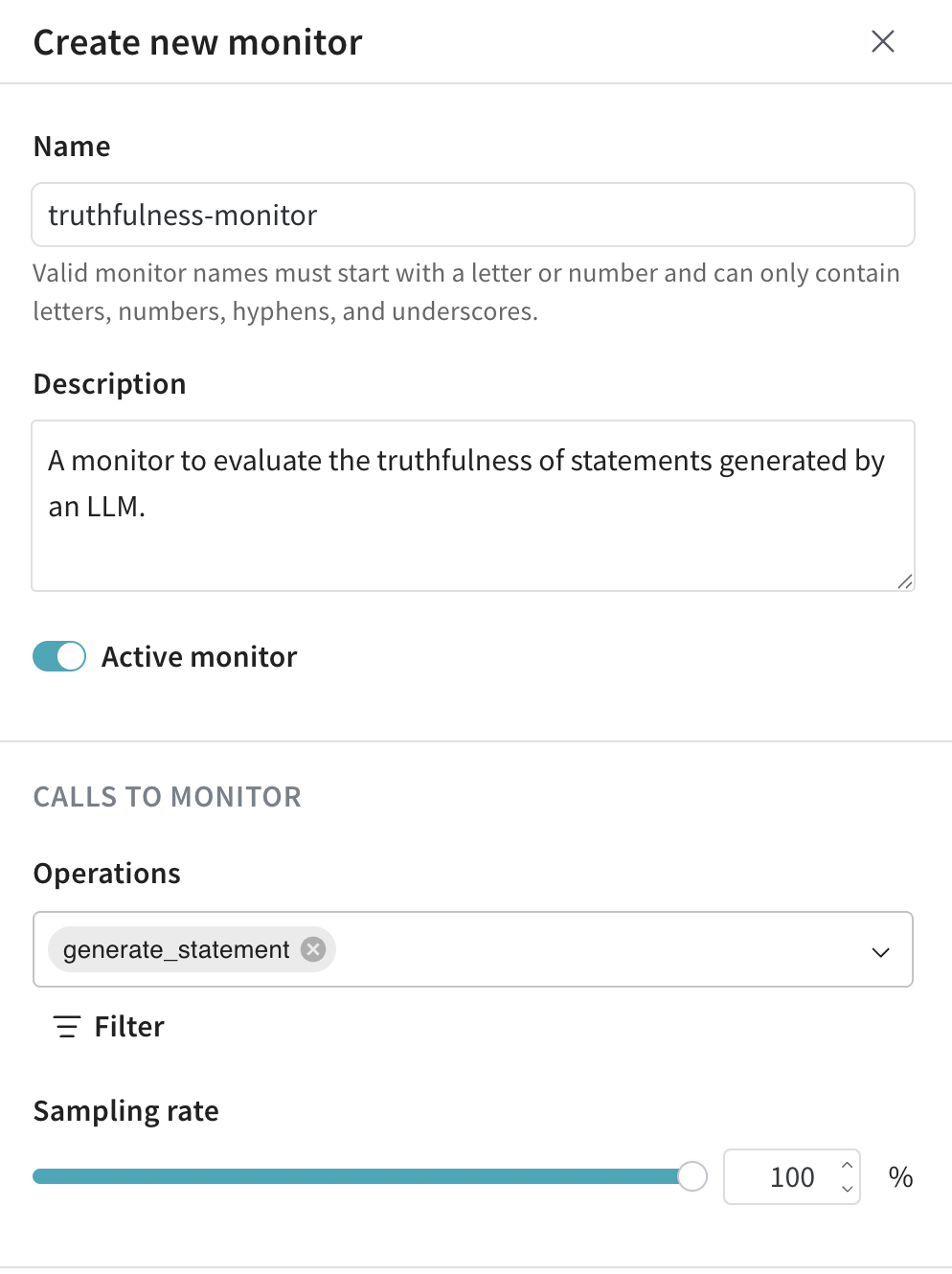
- Operations: Select
generate_statement.
- Sampling rate: Set to
100% to score every call.
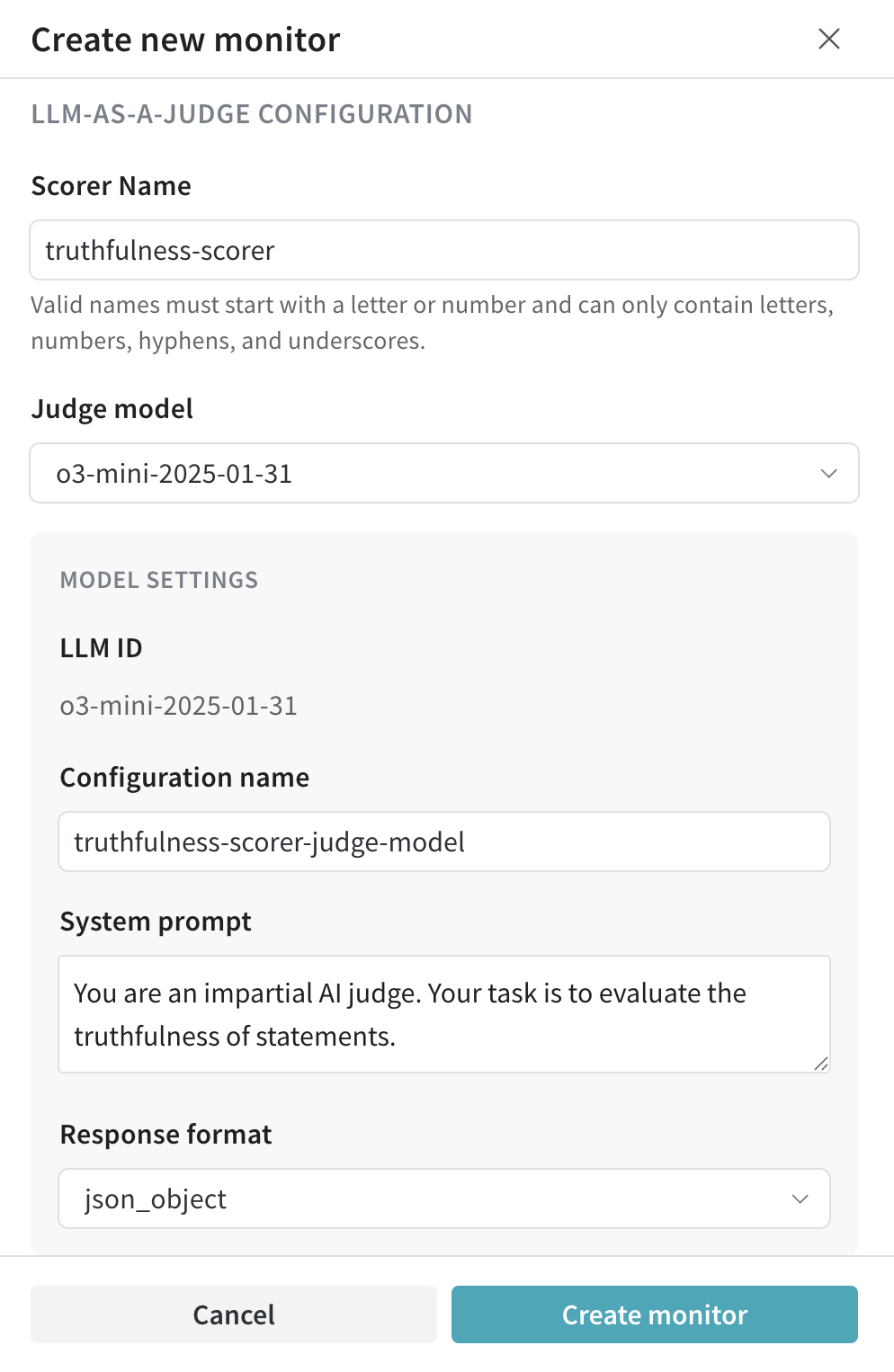
- Scorer name:
truthfulness-scorer
- Judge model:
o3-mini-2025-01-31
- System prompt:
You are an impartial AI judge. Your task is to evaluate the truthfulness of statements.
- Response format:
json_object
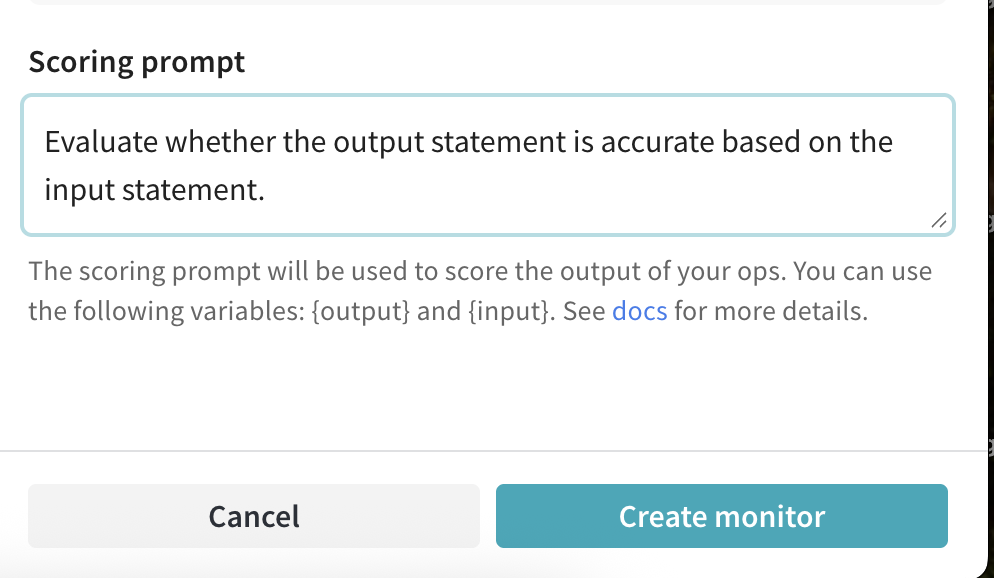
- Scoring prompt:
Evaluate whether the output statement is accurate based on the input statement.

This is the input statement: {ground_truth}

This is the output statement: {output}

The response should be a JSON object with the following fields:
- is_true: a boolean stating whether the output statement is true or false based on the input statement.
- reasoning: your reasoning as to why the statement is true or false.
-
Click Create Monitor.
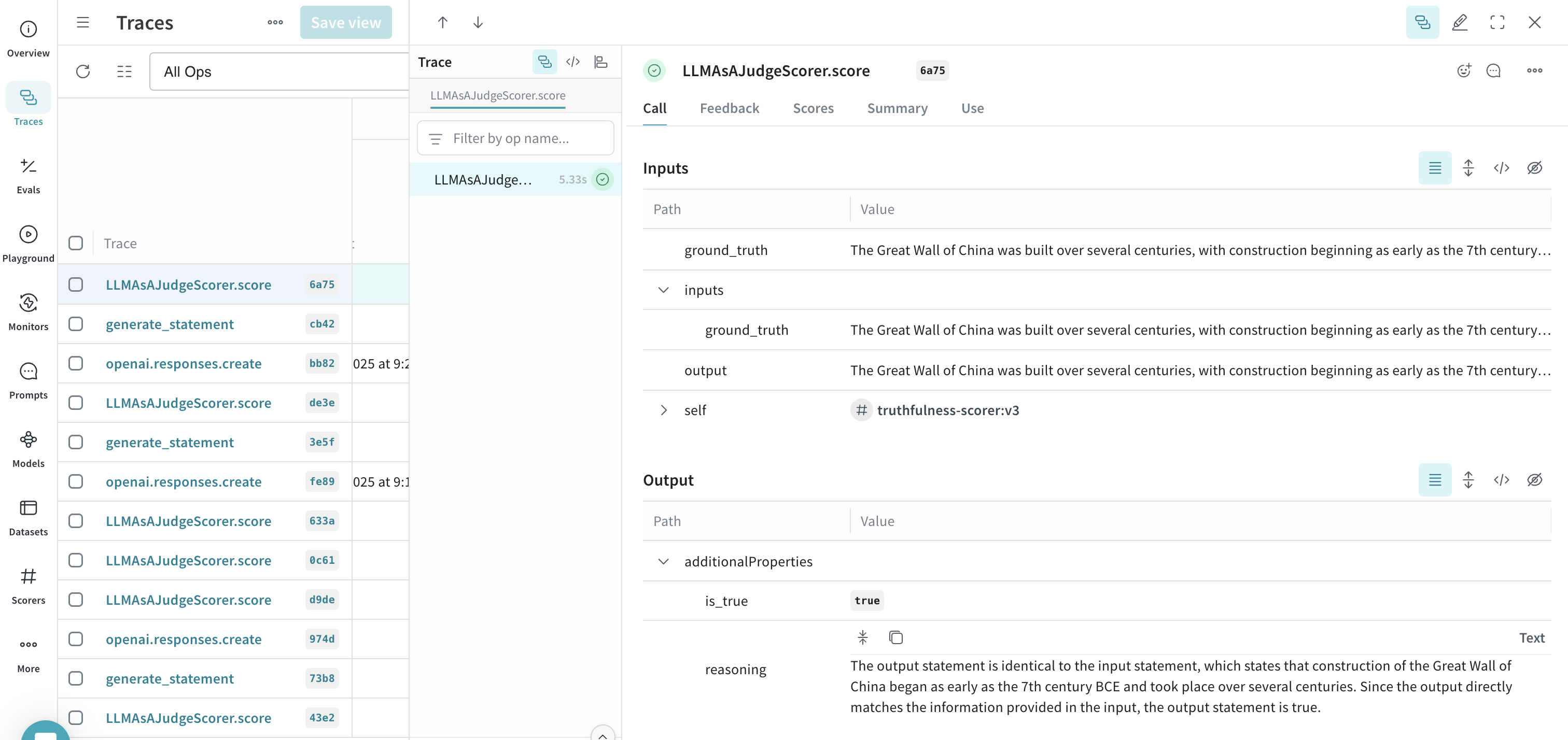
Step 4: Generate statements and view results
Generate statements for the monitor to evaluate:
generate_statement("The Earth revolves around the Sun.")
generate_statement("Water freezes at 0 degrees Celsius.")
generate_statement("The Great Wall of China was built over several centuries.")
Prompt variables
In scoring prompts, you can reference variables from your op. These values are automatically extracted when the scorer runs.
For a function like:
@weave.op
def my_function(foo: str, bar: str) -> str:
    return f"{foo} and {bar}"
| Variable | Description |
|---|
{foo} | The value of the input argument foo |
{bar} | The value of the input argument bar |
{inputs} | A JSON dictionary of all input arguments |
{output} | The result returned by your op |
Input foo: {foo}
Input bar: {bar}
Output: {output}
Set up guardrails
Guardrails actively intervene in your app’s behavior based on scores. Unlike monitors, guardrails require code changes because they need to affect your application’s control flow.
When to use guardrails
Use guardrails when you need to:
- Block responses that exceed a toxicity threshold
- Modify outputs before they reach users
- Enforce content policies in real-time
AWS Bedrock Guardrails
The BedrockGuardrailScorer uses AWS Bedrock’s guardrail feature to detect and filter content based on configured policies.
Prerequisites:
- An AWS account with Bedrock access
- A configured guardrail in the AWS Bedrock console
- The
boto3 Python package
You don’t need to create your own Bedrock client. Weave creates it for you. To specify a region, pass the bedrock_runtime_kwargs parameter to the scorer.
import weave
from weave.scorers.bedrock_guardrails import BedrockGuardrailScorer

weave.init("my_app")

guardrail_scorer = BedrockGuardrailScorer(
    guardrail_id="your-guardrail-id",
    guardrail_version="DRAFT",
    source="INPUT",
    bedrock_runtime_kwargs={"region_name": "us-east-1"}
)

@weave.op
def generate_text(prompt: str) -> str:
    # Your text generation logic here
    return "Generated text..."

async def generate_safe_text(prompt: str) -> str:
    result, call = generate_text.call(prompt)

    score = await call.apply_scorer(guardrail_scorer)

    if not score.result.passed:
        if score.result.metadata.get("modified_output"):
            return score.result.metadata["modified_output"]
        return "I cannot generate that content due to content policy restrictions."

    return result
Custom guardrails
For custom guardrail logic, you can create your own scorer and apply it programmatically. See Advanced: Code-based scoring for details.
Built-in scorers
Weave includes predefined scorers you can use with monitors or guardrails:
See Built-in scorers for the complete list.
Advanced: Code-based scoring
Most users should use UI-based monitors instead. Use code-based scoring only when you need custom logic that isn’t available through the monitor UI. Using the .call() method
To apply scorers, you need access to both the operation’s result and its Call object. The .call() method provides both:
# Standard call (no access to Call object):
result = generate_text(input)

# Using .call() to get both result and Call object:
result, call = generate_text.call(input)
Creating a custom scorer
A scorer is a class that inherits from Scorer and implements a score method:
import weave
from weave import Scorer

class ToxicityScorer(Scorer):
    @weave.op
    def score(self, output: str) -> dict:
        # Your toxicity detection logic here
        return {
            "flagged": False,
            "reason": None
        }
Applying scorers
Apply a scorer to a call using apply_scorer():
@weave.op
def generate_text(prompt: str) -> str:
    return "Generated response..."

async def evaluate_response(prompt: str):
    result, call = generate_text.call(prompt)
    score = await call.apply_scorer(ToxicityScorer())
    return score.result
Parameter matching
The score method receives:
output: The result from your function (always provided)- Any input parameters that match your function’s parameter names
@weave.op
def generate_styled_text(prompt: str, style: str) -> str:
    return "Generated text..."

class StyleScorer(Scorer):
    @weave.op
    def score(self, output: str, prompt: str, style: str) -> dict:
        # output, prompt, and style are automatically matched
        return {"style_match": 0.9}
Handling parameter name mismatches
Use column_map when your scorer’s parameter names don’t match your function’s:
@weave.op
def generate_text(user_input: str):
    return process(user_input)

class QualityScorer(Scorer):
    @weave.op
    def score(self, output: str, prompt: str):
        return {"quality_score": 0.8}

result, call = generate_text.call(user_input="Say hello")

# Map 'prompt' to 'user_input'
scorer = QualityScorer(column_map={"prompt": "user_input"})
await call.apply_scorer(scorer)
Adding additional parameters
Use additional_scorer_kwargs for parameters that aren’t part of your function:
class ReferenceScorer(Scorer):
    @weave.op
    def score(self, output: str, reference_answer: str):
        similarity = compute_similarity(output, reference_answer)
        return {"matches_reference": similarity > 0.8}

await call.apply_scorer(
    ReferenceScorer(),
    additional_scorer_kwargs={
        "reference_answer": "The Earth orbits around the Sun."
    }
)
Next steps


 Platform
 W&B Models
 W&B Weave
 W&B Inference
 W&B Training
 Release Notes